Blocking someone on YouTube is an essential step to protect your online space, maintain control over your content, and prevent harassment or spam. With YouTube becoming a hub for creators, marketers, and audiences worldwide, unwanted interactions can affect your experience and even your channel’s reputation. In 2026, YouTube offers multiple ways to block users, whether on comments, messaging, or viewing your content. Learning how to block someone efficiently allows you to manage your privacy, control engagement, and ensure a safe, stress-free environment. At GDMS, we specialize in providing expert guidance on YouTube privacy management, helping you implement effective strategies to block users without disrupting your audience or content flow. This guide covers every method, step-by-step instructions, and advanced tips to keep your channel secure, offering a complete solution for creators seeking peace of mind and professional support.
Why Blocking Someone on YouTube Matters
Blocking users on YouTube is crucial for maintaining a safe and enjoyable experience. Unwanted interactions, spam comments, and harassment can disrupt your content’s quality and engagement. By understanding why blocking matters, you gain control over your channel’s environment, protect your reputation, and ensure your audience interacts positively. Blocking also allows you to maintain privacy while curating the people who can view or comment on your videos. At GDMS, we emphasize proactive strategies to manage user interactions, preventing problems before they escalate. Implementing these measures helps creators focus on growth, content creation, and audience building, while ensuring harmful interactions are minimized. Effective blocking ensures your YouTube channel remains professional, secure, and welcoming, reflecting your commitment to quality and audience engagement.
Protect Your Channel Like a Pro – Explore GDMS YouTube Privacy Services
Prevent Harassment on YouTube and Stop Spam Comments
Harassment and spam are common challenges on YouTube, especially for creators with growing audiences. Blocking unwanted users helps prevent repeated negative interactions and keeps comment sections clean. It also reduces exposure to bots, fake accounts, or malicious messages. By addressing harassment proactively, you create a positive environment for viewers and maintain your channel’s credibility. GDMS provides guidance on how to identify and block these users effectively, ensuring your content remains protected and professional. Taking preventive action strengthens community trust, encourages engagement from genuine viewers, and reduces the risk of harmful interactions affecting your mental health or channel performance.
Restrict YouTube User Interactions for Safer Viewing
Blocking isn’t the only solution; restricting user interactions can protect your content without alerting users. YouTube allows creators to hide comments, limit messaging, or manage who can view specific videos. Restricting interactions ensures your channel stays secure while providing access to genuine viewers. GDMS can help implement these measures, giving you control over user behavior and maintaining a professional appearance. Restricting interactions complements blocking, offering a flexible strategy that balances safety and audience engagement. This approach is vital for creators who want to maintain high-quality interactions without over-policing their content.
How Blocking Helps Manage Your YouTube Privacy Settings
Blocking users is a key component of YouTube privacy management. It allows you to control who can comment, message, or view your videos, protecting your content from unwanted attention. Effective privacy management helps safeguard personal information and channel integrity. GDMS specializes in creating customized strategies to block or restrict users based on your preferences, ensuring your YouTube environment remains secure. By managing privacy settings alongside blocking, you maintain complete control over your audience, interactions, and content exposure. This proactive approach supports long-term channel growth, reduces potential risks, and enhances the viewer experience.
Different Ways to Block Someone on YouTube
YouTube provides several methods to block users, depending on your goals—blocking from commenting, messaging, or viewing content. Understanding these options allows creators to choose the best approach for each situation. Blocking on a desktop or mobile device follows slightly different steps, and YouTube updates its interface regularly. GDMS ensures you stay up-to-date with these methods, providing step-by-step guidance and best practices. With the right approach, you can protect your content and audience while maintaining a professional presence. We help you implement tailored blocking strategies that match your channel’s needs and security priorities.
How to Block Someone from Commenting on Your YouTube Videos
Blocking users from commenting keeps your comment section free of spam, harassment, or disruptive behavior. You can block individual users or restrict multiple accounts through YouTube Studio settings. This process prevents unwanted comments from appearing without alerting the user, maintaining channel professionalism. GDMS guides creators in efficiently blocking or hiding users while monitoring the impact on engagement. Protecting your comment section enhances viewer experience, encourages constructive feedback, and safeguards your reputation. Implementing these measures is essential for any creator serious about maintaining a safe and thriving YouTube presence.
Block YouTube Comments from a Specific Person
You can target specific users by blocking them from commenting on your videos. Navigate to the user’s profile, select the block option, and confirm. This ensures that only problematic users are restricted without affecting other viewers. GDMS emphasizes precise and strategic blocking, allowing you to maintain an engaged and safe community. By targeting individual accounts, you minimize disruption while addressing harassment or spam effectively.
Can I Block a User from Commenting Without Them Knowing?
Yes, YouTube allows you to block users discreetly, so they are unaware their comments are hidden. This is ideal for preventing conflicts or backlash while maintaining control over your content. GDMS implements these strategies for creators seeking privacy, safety, and professionalism. Discreet blocking ensures the user cannot interfere with your channel, but your audience continues to enjoy a safe, constructive environment.
How to Block a YouTube User from Messaging or Contacting You
Blocking users from messaging prevents unwanted interactions or spam in YouTube’s messaging system. This protects your privacy and reduces harassment risk. Creators can block users directly from the messaging interface or through their profile. GDMS provides guidance on best practices, including monitoring suspicious accounts and taking proactive action. Managing communication channels ensures your interactions are safe, controlled, and productive, contributing to a more positive online presence.
How to Stop a YouTube User from Interacting with Your Videos
YouTube allows creators to restrict users from engaging with their content without blocking them entirely. This feature is useful when you want to limit influence from specific accounts while maintaining general audience access. GDMS guides creators in leveraging these settings for maximum channel security and minimal disruption. Restricting interactions balances safety with engagement, ensuring content remains accessible to genuine viewers.
How to Prevent a YouTube Channel from Contacting Me
To prevent a channel from contacting you, use YouTube’s block feature for messaging and comments. Blocking the channel ensures no messages, comments, or interaction notifications are received. GDMS provides step-by-step guidance to implement these protections effectively, maintaining a stress-free and secure YouTube environment. This approach allows creators to focus on content creation without interference from unwanted accounts.
How to Block Someone from Viewing Your YouTube Content
YouTube allows creators to control who can view their videos, which is critical for privacy and content protection. Blocking a user from viewing ensures they cannot access your content while leaving it visible to other viewers. This is particularly useful for sensitive content, age-restricted material, or channels with specific audience targeting. GDMS helps creators implement these privacy measures strategically, balancing visibility with security. By restricting access selectively, you maintain control over your channel, protect your audience from unwanted interference, and preserve the integrity of your content without compromising engagement metrics.
Block a YouTube Account from Seeing My Content
To block a user from viewing your videos, navigate to their profile, select “Block user,” and confirm. This prevents them from accessing your channel entirely, including comments, live streams, and video content. GDMS ensures this process is handled efficiently, helping creators safeguard their content without alerting the user. Blocking individual accounts is an effective way to maintain a professional, secure channel and prevent harassment or unwanted monitoring of your videos.
How Can I Hide My YouTube Videos from a Specific User?
Hiding videos from specific users allows for granular privacy control without restricting your channel’s overall reach. YouTube offers settings to limit visibility for certain accounts, ensuring they cannot watch, comment, or interact with your content. GDMS guides creators on selecting the right privacy settings for each video, maintaining audience engagement while keeping unwanted viewers restricted. This approach protects creators’ intellectual property, personal content, and community experience.
Step-by-Step YouTube User Blocking Tutorial for 2026
Blocking users on YouTube can differ slightly depending on the device. Following a step-by-step approach ensures you implement each block correctly and securely. Whether using a desktop or mobile device, the process is straightforward with the right guidance. GDMS provides comprehensive tutorials for creators to block users, manage privacy, and protect their channels effectively. By following these steps, you minimize the risk of errors, maintain professional control over your content, and ensure your audience enjoys a safe viewing experience.
Skip the Hassle – Get GDMS Custom YouTube Privacy Plan to Manage Your Channel Security
How Do I Block Someone on YouTube Quickly on a Desktop Browser Method?
Blocking a user on a desktop browser involves accessing their profile and using YouTube’s block feature. This method allows for fast, precise action and is ideal for creators managing multiple accounts. GDMS provides detailed instructions to ensure you block users correctly, maintain engagement metrics, and prevent future interactions from unwanted viewers. Blocking via desktop is efficient for creators who handle content moderation frequently and need full control over their channel’s privacy and safety settings.
Sign in to Your YouTube Account
Ensure you are signed into the correct YouTube account before attempting to block a user. This prevents accidental restrictions on other accounts and allows access to all channel management features. GDMS recommends double-checking account login to avoid mistakes, particularly for creators managing multiple channels. Proper account management is the first step in securing your channel and ensuring privacy measures are applied effectively.
Navigate to the Channel You Wish to Block
Locate the user’s channel profile you want to block. Accessing the correct profile ensures that the block is applied to the intended user. GDMS advises reviewing the user’s activity to confirm their behavior warrants blocking. This step prevents accidental restrictions and ensures targeted action, maintaining a professional approach to channel management.
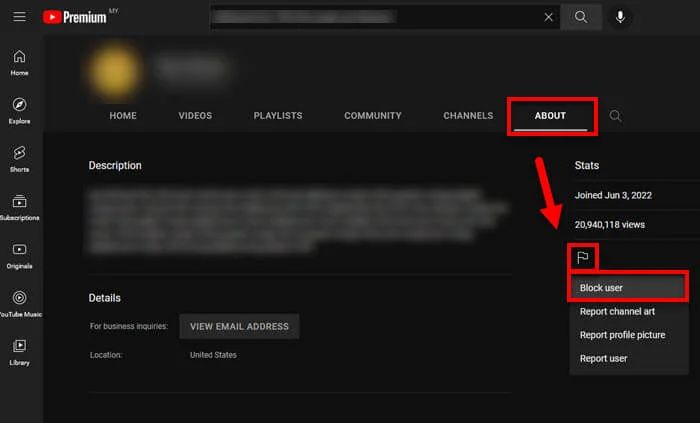
Click the About Tab
On the user’s channel, select the About tab to access additional options, including the block feature. This centralized location simplifies the blocking process, providing a clear workflow for creators. GDMS highlights the importance of using the About tab to avoid missing the block function and ensures users are properly restricted.
Click the Flag/Report Icon and Select Block User
After accessing the About tab, click the Flag or Report icon and select Block User. This formally restricts the user from commenting, messaging, or interacting with your channel. GDMS guides creators in confirming the block action to prevent mistakes and ensure that your privacy settings are applied accurately. Blocking through this method is reliable and discreet.
Confirm the Action in the Pop-Up Window
A confirmation pop-up appears to finalize the block. Confirming ensures the action is successfully executed and prevents accidental blocking errors. GDMS recommends reviewing the block list afterward to verify changes. This step completes the desktop blocking process, securing your channel from unwanted interactions.
Block Someone on YouTube Channel Without Them Knowing Mobile App Method (Android & iOS)
Mobile devices allow creators to block users discreetly, without alerting them. This method is essential for maintaining privacy and preventing confrontation. GDMS provides detailed guidance for both Android and iOS users, ensuring the block is applied correctly while keeping the user unaware. Mobile blocking is convenient for creators on the go and ensures channel safety anytime, anywhere.
Open the YouTube App and Go to the Target Channel’s Profile
Launch the YouTube app, navigate to the user’s profile, and prepare to restrict their access. GDMS emphasizes confirming the correct profile before blocking to avoid mistakes. This step is critical for effective mobile channel management.
Tap the Three-Dot Menu in the Top Right Corner
Access the options menu by tapping the three-dot icon. This reveals the block or hide options necessary to restrict the user. GDMS ensures creators understand menu navigation to streamline the blocking process on mobile devices.
Select Block User or “Hide User from My Channel”
Choose the appropriate action based on your needs: block the user entirely or hide them from interacting with your content. GDMS advises creators on which option is suitable for different scenarios, optimizing channel safety without reducing legitimate engagement.
Tap Block in the Confirmation Dialogue
Confirm the action in the pop-up to finalize the restriction. GDMS recommends reviewing blocked users afterward to ensure the action was successfully applied. This completes the mobile blocking process efficiently and discreetly.
Managing Blocked Users on YouTube
YouTube allows creators to view and manage a list of blocked users, providing flexibility to adjust privacy settings as needed. Accessing the blocked users list lets you unblock accounts, review restrictions, and ensure your channel is protected. GDMS advises creators to regularly review blocked users to maintain control over interactions while keeping engagement opportunities open for genuine viewers. Proper management prevents accidental blocking of legitimate audience members and ensures your channel remains secure without impacting overall reach. Efficiently managing blocked users supports channel growth while maintaining safety and professionalism.
Alternative “Not Interested” Method
YouTube also offers the “Not Interested” feature as a softer approach to manage interactions. This allows creators to hide certain comments or suggestions without fully blocking a user. GDMS recommends this method when you want to reduce exposure to unwanted interactions subtly, keeping your channel environment positive while maintaining user engagement. This alternative balances privacy and flexibility, particularly for creators managing large or diverse audiences.
How to View and Edit Your YouTube Blocked Users List
To view or edit blocked users, navigate to your YouTube settings under “Privacy” and access the blocked users section. From here, you can add or remove accounts as needed. GDMS provides guidance to ensure edits are done correctly and efficiently, keeping your channel secure while maintaining a professional image. Reviewing this list regularly ensures that all restrictions align with your current privacy strategy and audience management goals.
Unblock Someone on YouTube: When and How to Do It
Unblocking a user restores their ability to interact with your content. This is useful when conflicts are resolved, or if you want to give certain users a second chance. GDMS recommends a strategic approach, unblocking only after evaluating potential risks to your channel. Following proper steps ensures that your content remains protected, engagement metrics stay positive, and interactions continue in a controlled manner.
Common Questions About Blocking Users on YouTube
Creators frequently have questions regarding blocking functionality, its impact, and best practices. Understanding these details prevents mistakes and ensures your channel remains secure. GDMS provides clear, concise answers to common queries, helping creators feel confident in managing their audience effectively. Addressing these questions also builds trust and authority, which is essential for creators and businesses managing YouTube content professionally.
Will Someone Know If I Block Them on YouTube?
YouTube does not notify users when they are blocked. They may notice limited interactions but will not receive a direct alert. GDMS advises creators on leveraging this discreet blocking to protect their privacy while maintaining professional channel management. This ensures unwanted users are restricted without creating unnecessary conflict or attention.
Can You Block Someone on YouTube Permanently?
Blocking on YouTube is indefinite unless manually reversed. Users remain blocked until you decide to unblock them. GDMS emphasizes consistent monitoring of blocked accounts to prevent security lapses while maintaining flexibility to unblock when appropriate. Permanent blocking is ideal for repeat offenders, spam accounts, or users causing harassment.
What Is the Fastest Way to Block a YouTube User?
The fastest method to block a user is via their profile page using the block feature. Desktop or mobile methods are both efficient, allowing creators to act immediately when encountering harassment or spam. GDMS provides step-by-step guidance to ensure quick, accurate blocking, minimizing exposure to harmful interactions while maintaining engagement for legitimate viewers.
How Do You Block Someone on YouTube in 2026?
In 2026, YouTube offers updated features for blocking users across desktop and mobile platforms. GDMS stays updated with these changes to ensure creators follow the most effective methods. From blocking comments to restricting messaging and hiding content, our approach provides comprehensive protection while maintaining a positive user experience. By understanding all available tools, creators can secure their channels efficiently.
Advanced Tips to Protect Your YouTube Channel and Content
Blocking users is essential, but advanced strategies offer an additional layer of protection. You can combine privacy settings, comment moderation, and automated tools to prevent harassment and spam. GDMS guides creators on implementing these measures, helping maintain channel safety, content quality, and audience satisfaction. Using these tips ensures your channel operates smoothly while minimizing disruptions from unwanted interactions.
Stay Ahead of Spammers – GDMS Keeps Your Social Accounts Safe
Restrict YouTube User Interactions Without Blocking
Limiting interactions allows creators to manage audience behavior without permanently blocking users. YouTube provides options to hide comments or restrict certain actions. GDMS advises on best practices to achieve this, balancing engagement with safety. These measures protect content integrity while allowing genuine viewers to interact freely.
Hide YouTube Comments from Someone Without Blocking
You can hide comments from specific users without fully blocking them. This ensures your comment section remains clean, reducing spam or negative content without impacting your audience’s engagement. GDMS helps creators implement these strategies efficiently, maintaining a positive environment for both the channel and viewers.
Stop YouTube Spam Comments Automatically
Using YouTube’s moderation tools, creators can automatically filter spam comments based on keywords, phrases, or user activity. GDMS provides advanced strategies to fine-tune these settings, ensuring your comment section stays safe and constructive. Automated filtering minimizes manual intervention and reduces exposure to unwanted interactions.
How GDMS Can Help Manage Your YouTube Privacy and Channel Security
GDMS specializes in protecting YouTube channels through customized strategies. We assist creators in blocking users, restricting interactions, managing comments, and setting up privacy rules tailored to each channel’s needs. Our services ensure your content is protected, engagement remains high, and your channel’s professional image is maintained. By leveraging our expertise, creators can focus on growth and content creation without worrying about security or harassment.
Why Choose GDMS for YouTube Channel Management & Protection
GDMS is the leading marketing and development agency providing end-to-end YouTube solutions. Our team ensures channels are secure, comments are moderated, and privacy settings are optimized. We offer strategies that combine technical know-how, industry experience, and creative solutions to help creators grow safely. Choosing GDMS guarantees professional support, actionable insights, and peace of mind, making your YouTube journey productive and stress-free.
Complete Marketing & Development Solutions for YouTube Growth
GDMS offers full-scale services to enhance channel performance, from analytics optimization to content strategy and audience engagement. Our solutions help creators grow their channels effectively while maintaining privacy and security. We implement tailored plans to meet your goals and ensure measurable results.
Expert Guidance to Prevent Harassment and Spam on Your Channel
GDMS provides expert recommendations to prevent harassment, spam, and negative interactions. Our strategies include proactive blocking, comment moderation, and privacy management, keeping your channel professional and safe. Creators benefit from our experience, ensuring a positive community for viewers.
Customized Strategies to Secure Your Content and Audience
GDMS develops personalized blocking, moderation, and privacy strategies that match your channel’s unique requirements. Our approach balances security with audience engagement, helping creators protect their content while building trust with their viewers.